Speech Fluency Tool

Speak with
confidence

A Chrome extension that uses delayed auditory feedback (DAF) to help people who stutter speak more fluently.
Learn more
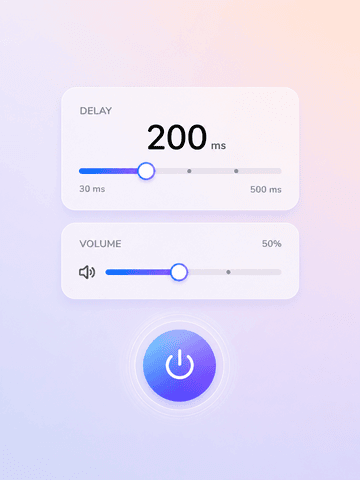
SayCloud Chrome Extension interface showing DAF controls

What is DAF?

Delayed Auditory Feedback

DAF plays your voice back to you with a slight delay through headphones. This altered feedback naturally slows your speech rate and reduces stuttering. It's a well-researched technique used by speech therapists worldwide.

Features

Everything you need

Professional speech tools, right in your browser. No downloads, no accounts.

Delay Control

Adjust the delay from 50ms to 300ms. Find the sweet spot that works best for your speech pattern.

Pitch ShiftComing soon

Alter the pitch of your feedback. A different-sounding voice can further enhance fluency for some speakers.

White NoiseComing soon

Mask your auditory feedback with adjustable white noise. Helps reduce speech anxiety and self-monitoring.

MetronomeComing soon

Set a rhythmic beat to pace your speech. Helps maintain a steady, controlled speaking rate.

Who is it for

Built for real needs

Stuttering

DAF is proven to help reduce stuttering blocks and repetitions by altering your auditory feedback loop.

Cluttering

Delayed feedback helps slow down rapid, irregular speech patterns common in cluttering.

Speech Anxiety

Paced speech reduces self-consciousness during presentations, calls, and public speaking.

Speech Therapy

Practice DAF techniques at home between sessions with your speech-language pathologist.

Public Speaking

Prepare for talks and meetings by training with controlled speech pacing and feedback.

Accent Work

DAF helps control speech rate when working on pronunciation and accent modification.

How it works

Three simple steps

1
Install extension

Add SayCloud to Chrome from the Web Store. It's free and takes seconds.

2
Grant microphone

Allow mic access when prompted. Audio never leaves your device.

3
Start speaking

Put on headphones, press the power button, and start speaking with confidence.

FAQ

Common questions

No. All audio processing happens on your device in real-time. Nothing is ever recorded, stored, or sent to any server. Your microphone data stays in your browser and is discarded the moment you stop.

Yes, completely free. All features are available at no cost, with no premium plans or hidden fees.

Yes. Once installed, SayCloud works without an internet connection. All audio processing runs locally in your browser — no server needed.

Google Chrome and Chromium-based browsers — Edge, Brave, and Opera — version 109 or later.

No. SayCloud has no analytics, no tracking, and no third-party services. It doesn't even have a backend server. Your data stays on your device, period.

When you first press the power button, Chrome will ask for microphone permission — click "Allow." If you accidentally blocked it: 1. Click the site settings icon in the left side of the address bar 2. Find "Microphone" in the permissions list 3. Change it from "Block" to "Allow" 4. Reload the page and try again You can also manage permissions globally — paste this into your address bar: Then find SayCloud in the list and set it to "Allow."

Pinning keeps SayCloud one click away in your toolbar: 1. Click the Extensions button in the top-right corner of Chrome 2. Find SayCloud in the list 3. Click the pin icon next to it Once pinned, SayCloud stays visible in your toolbar — no need to dig through the extensions menu every time.

Yes. DAF works by playing your voice back with a delay. Without headphones, the delayed audio would come through your speakers and create a feedback loop. Any wired or wireless headphones will work.

Start with 100–150ms and adjust from there. Most people find their sweet spot between 50ms and 200ms. A longer delay slows speech more, while a shorter one feels more natural. Note: Bluetooth headphones add their own audio latency (typically 50–200ms), which stacks on top of the DAF delay. You may need to lower the delay setting to compensate, or use wired headphones for more precise control.

Yes. SayCloud runs in its own popup and doesn't interfere with other apps. You can use it alongside Google Meet, Zoom, Teams, or any other call — just keep Chrome open.

Ready to speak with confidence?

Free, private, and works offline. Try SayCloud today.